Since I recently shared our administrative journey regarding how we successfully applied for our daughter’s dual citizen baby passport, I realized I skipped a very crucial step: the photograph.
It is absolutely essential to have a photo that is the exact required size and strictly follows the government criteria. I know firsthand that taking a formal, rule-compliant photo of a newborn is extremely difficult. For us, it was even harder because she was born premature and spent her first two months in the NICU. We only had about a 30-minute window each day when she was actually awake, alert, and calm enough to even attempt taking a picture.
You might wonder why we were in such a frantic hurry to get her passport sorted at that age. South African paperwork is notoriously slow, and we wanted to get her documents finalized so she is ready for future family trips to experience.
Today, I am going to share how I took the perfect DIY baby passport photo in Korea using just my smartphone and a few dollars, allowing us to successfully secure both her South African and Korean passports.
Why You Should Skip the Photo Studio
Taking an infant to a professional photo studio can be incredibly stressful for both the baby and the parents. The bright flashes, unfamiliar environment, and pressure to perform on the photographer’s schedule usually result in tears. It is also quite expensive and time-consuming.
Doing it yourself at home is significantly easier and more convenient. Learning how to bypass expensive services is a great way to save your family budget, much like how expats can save money by buying secondhand baby gear locally.
Step 1: Taking the DIY Baby Passport Photo in Korea
First, find a simple outfit that is easy to put on your baby. Avoid white clothing so they do not blend into the background.
Lay the baby flat on their back on the floor. If you have a plain white blanket or bedsheet to put underneath them, use it, but do not stress if you don’t have one. Because of modern technology, the original background is actually unnecessary since you can easily edit it out later.
Hover over the baby and try to get them to keep their head straight and look directly up at your smartphone camera lens. I honestly think this is the most difficult part of the entire job. Shake a toy, make funny noises, and take a burst of rapid photos to capture that split-second of eye contact.
Step 2: Editing the Photo with AI
Korean passport photo regulations are quite strict. The background must be pure white, and the subject must be looking straight ahead. [Korean Ministry of Foreign Affairs – Passport Photo Regulations]
If your photo isn’t perfect, do not worry. For my daughter’s photo, I simply uploaded the best shot I had into a free AI tool (I used ChatGPT, but Gemini or Canva work just as well). I prompted the AI to slightly adjust her pupil direction so she was looking perfectly straight ahead, and I asked it to remove the floor blanket and replace it with a pure white background. It worked flawlessly and took less than two minutes.
Step 3: Printing Your Photo Online (Using Photomon)
You do not need to hunt down a physical photo printing kiosk in your neighborhood. You can easily order the prints online. I used a popular Korean website called Photomon, but there are many similar services. Here is how to navigate it:

Account Login and Setup
Go to the Photomon website. On the main page, you have to log in first. You can easily link your existing Kakao, Naver, or Facebook ID, which saves you from creating a brand new account from scratch. You need to log in so you can securely provide your home delivery address and phone number. [Photomon – Official Photo Printing Service]
Navigating the Korean Menu
Once you log in, you will see many product options like custom stickers, calendars, and photobooks. However, what we need is the official document section.
- Navigate to the top menu and click on “사진인화” (Photo Print).
- Look for the sub-menu labeled “증명사진” (ID Photo).
- From the list of sizes, select the “여권” (Passport) option. This ensures the photo is printed at the exact 3.5cm x 4.5cm required size.

Uploading and Ordering
After selecting the passport photo option, you will be taken to a simple editing page where you can upload your AI-edited baby photo. Adjust the image so the head fits within the official guideline frame and confirm that the proportions look correct.
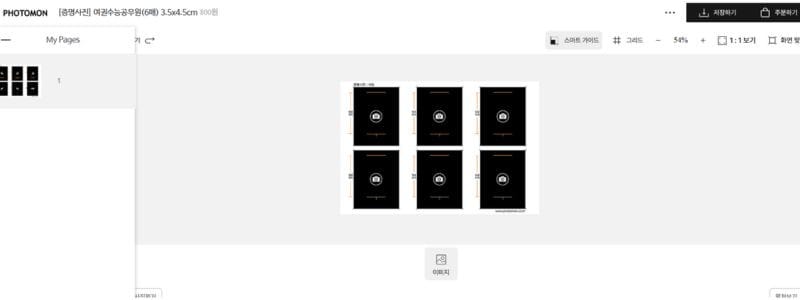
Once the photo placement is finished, proceed to the order and payment page.
Delivery Method
You can choose standard parcel delivery (택배). Some products may offer quick delivery options, but standard delivery is usually sufficient for passport photos.
Payment Methods
Photomon supports several common Korean payment methods, including:
- Credit Card (신용카드)
- Bank Transfer (무통장입금)
- Mobile Payment (휴대폰 결제)
- Real-time Bank Transfer (실시간 계좌이체)
- Payco
- Naver Pay
- Kakao Pay
- Virtual Account (에스크로)
Simply select your preferred payment option, complete the payment, and confirm your delivery address.
After the order is completed, the printed photos will be shipped directly to your home.
Delivery and Final Thoughts
Once the order is placed, you can track the delivery process directly on the site. For me, it took exactly 3 days to arrive at our door via standard parcel delivery.

By handling this yourself, you avoid the stress of a studio outing, freeing up your weekend for a much more relaxing family stroll at a beautiful riverside park. Without an expensive photo printer or fancy camera gear, I got a flawless set of passport photos for just a couple of dollars. I plan to write more guides about navigating Korean bureaucracy, so keep this DIY trick in mind for your future paperwork!
Frequently Asked Questions (FAQ)
Q1: Will the Korean immigration office reject a smartphone photo? A: No, as long as the printed photo meets the strict physical guidelines (3.5cm x 4.5cm, pure white background, correct head proportions, no teeth showing), the government does not care what camera was used to take it.
Once you have your photos printed and trimmed, you are ready for your embassy appointment — you can read about our recent experience applying for a first passport at the South African embassy in Seoul to see how the rest of the application process works.
Q2: How many photos come in one order? A: When you select the standard passport (여권) option on printing sites, it usually prints a single 4×6 inch sheet containing 6 or 8 pre-sized passport photos that you can carefully cut out at home.